참고) 무료 데모 버전은 스팀에서 다운로드 가능.
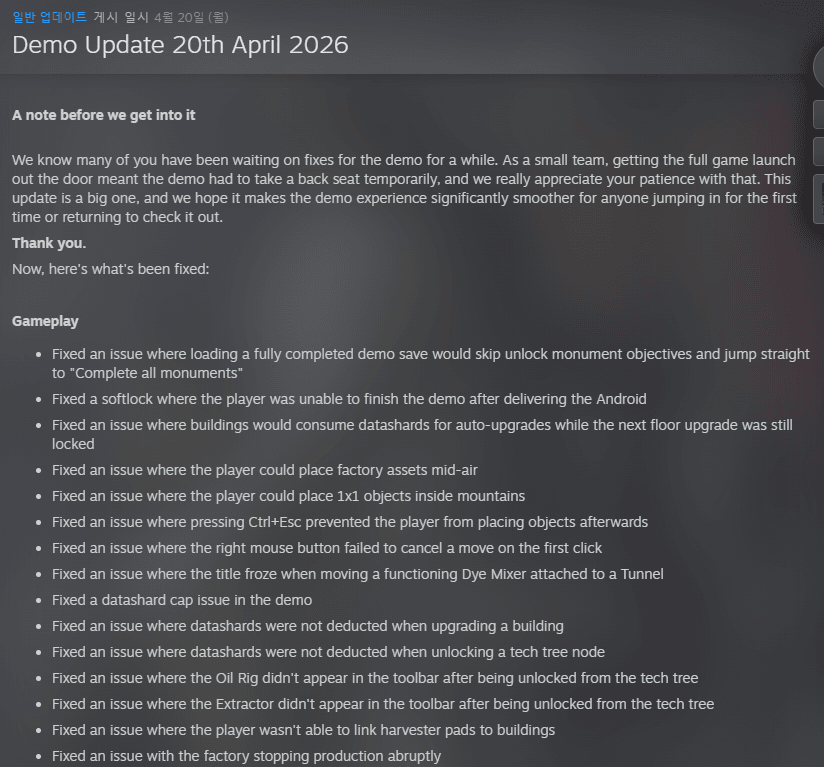
?+ 데모 버전 주요 업데이트 및 수정 사항
시작하기 전에: 많은 분이 데모 수정을 기다려 주신 것을 잘 알고 있습니다. 소규모 팀으로서 정식 출시 준비에 집중하느라 데모 업데이트가 잠시 밀렸었지만, 기다려 주셔서 정말 감사합니다. 이번 업데이트는 처음 시작하는 분이나 다시 확인하러 오신 분들 모두 훨씬 매끄러운 경험을 하실 수 있도록 준비한 대규모 업데이트입니다.
주요 수정 사항
게임플레이
세이브 데이터 관련: 데모 완료 세이브 로드 시 목표가 건너뛰어지는 현상 및 안드로이드 전달 후 게임이 멈추는(소프트락) 현상 수정.
건물 및 자원: 건물 업그레이드가 잠겨있음에도 데이터 샤드가 소모되던 문제, 데이터 샤드 한도 및 차감 오류 수정.
배치 오류: 공장 에셋을 공중에 설치하거나 산 안에 물체를 배치할 수 있었던 버그 수정.
조작: Ctrl+Esc 입력 후 오브젝트 배치가 안 되던 문제, 우클릭 취소가 한 번에 안 되던 현상 수정.
기타: 오일 리그와 추출기가 기술 트리 해제 후 도구 모음에 나타나지 않던 문제 해결.
세이브 및 로딩
호환성: 데모 세이브를 정식 버전에서 불러올 때 구조물이 사라지거나 나무로 변하는 현상 수정.
안정성: 메인 메뉴에서 로드 시 크래시 발생 및 로딩 화면 멈춤 현상 수정.
플랫폼: 스팀 데모 빌드가 잘못된 폴더에 저장되던 문제 해결.
튜토리얼 및 텍스트
다국어 지원: 한국어, 일본어, 중국어(간체/번체)에서 튜토리얼 및 봇 팝업 텍스트가 표시되지 않던 문제 수정.
UI 개선: 메뉴 곳곳에 나타나던 임시 텍스트(Placeholder) 제거 및 텍스트 겹침 현상 해결.
정보 오류: 매뉴얼 내 수확기 패드 용량 및 아이템 이름 등 잘못된 정보 수정.
설정 및 그래픽
🆕 "프리 빌드(Free Build)" 맵 출시! (4월 16일)
이제 Modulus에서 지형 제약 없이 자유롭게 공장을 지을 수 있는 프리 빌드 맵을 사용할 수 있습니다!
🎁 기타 소식
스팀 트레이딩 카드 출시: 이제 게임을 플레이하며 카드를 수집하고 거래할 수 있습니다.
할인 정보: 4월 16일까지 'triple-i initiative' 세일의 일환으로 10% 할인이 진행되었습니다. (현재 날짜 기준 종료 여부 확인 필요)
팀의 한마디: "여러분의 열광적인 반응에 진심으로 감사드립니다. 스크린샷을 공유하고 최적의 배치를 고민하는 모습들이 저희에겐 큰 힘이 됩니다. 앞으로도 피드백 게시판을 통해 많은 의견 부탁드립니다!"
— Team Happy Volcano
아래는 원문 전체
A note before we get into it
We know many of you have been waiting on fixes for the demo for a while. As a small team, getting the full game launch out the door meant the demo had to take a back seat temporarily, and we really appreciate your patience with that. This update is a big one, and we hope it makes the demo experience significantly smoother for anyone jumping in for the first time or returning to check it out.
Thank you.
Now, here's what's been fixed:
Gameplay
Fixed an issue where loading a fully completed demo save would skip unlock monument objectives and jump straight to "Complete all monuments"
Fixed a softlock where the player was unable to finish the demo after delivering the Android
Fixed an issue where buildings would consume datashards for auto-upgrades while the next floor upgrade was still locked
Fixed an issue where the player could place factory assets mid-air
Fixed an issue where the player could place 1x1 objects inside mountains
Fixed an issue where pressing Ctrl+Esc prevented the player from placing objects afterwards
Fixed an issue where the right mouse button failed to cancel a move on the first click
Fixed an issue where the title froze when moving a functioning Dye Mixer attached to a Tunnel
Fixed a datashard cap issue in the demo
Fixed an issue where datashards were not deducted when upgrading a building
Fixed an issue where datashards were not deducted when unlocking a tech tree node
Fixed an issue where the Oil Rig didn't appear in the toolbar after being unlocked from the tech tree
Fixed an issue where the Extractor didn't appear in the toolbar after being unlocked from the tech tree
Fixed an issue where the player wasn't able to link harvester pads to buildings
Fixed an issue with the factory stopping production abruptly
Saves & Loading
Fixed an issue where loading a demo save in the full game caused all structures to go missing
Fixed an issue where map conversion on an old save replaced structures with trees
Fixed a crash/null reference error when pressing Load on the main menu
Fixed an issue where the game got stuck on the loading screen when pressing Continue
Fixed an issue where saves from the main build were visible in the demo build
Fixed an issue where the demo build saved to the wrong folder on Steam
Fixed an issue where load game options and previous saves were missing in the demo staging build
Fixed various save-related issues in the demo build
Fixed an issue where a new save would incorrectly show an "older map" warning
Tutorial & Onboarding
Fixed a blocker where the player could place multiple operators during the tutorial
Fixed an issue where the Assembler operator tutorial highlight carried over into new saves with no tutorial
Fixed an issue where the Cutter tutorial progressed incorrectly when selecting the 4th configuration size
Fixed an issue where autosave for onboarding disabled itself if the player reloaded after starting onboarding
Fixed multiple debug strings appearing throughout onboarding
UI & Text
Fixed placeholder text appearing across multiple menus and UI states including the Day/Night cycle menu, challenge module delivery, blue paint production, game start without tutorial, monument Needs/Creates sections, MaxZoom settings, Stamper configuration, and Fences cosmetic item
Fixed text in tutorial and narrative bot pop-ups not displaying for Traditional Chinese, Simplified Chinese, Japanese, and Korean
Fixed language not updating in pop-ups triggered from message boxes or in the controls menu when changing language
Fixed text overlapping with the Pin All button in the module viewer
Fixed the starting node name overlapping in the Tech Tree when zoomed out
Fixed the 1x4x1 module not adjusting correctly inside the Cutter
Fixed the node warning changing appearance after a few seconds
Fixed incorrect information in the manual for the Harvester Pad capacity, Hexacrystal extraction operator name and image, Remove and Clear Items tool names, and Harvester Pad general info
Fixed the Demo tag in the save/load list being inconsistently shown
Fixed long save names overlapping the Demo icon in the save list
Fixed the "Available in full game" text not showing for locked decorations
Fixed overwrite save, back to main menu, and quit game popups incorrectly appearing after closing the save list or in-game menu
Fixed the Delivery Dock not consistently displaying the "Deliveries capped" message
Fixed an issue where clicking the Space Depot showed yellow bots and datashards instead of grey and blue
Fixed the wrong image/model being shown for the Delivery Dock
Fixed demo information being displayed in the full game build
Fixed no warning being shown when the delivery dock stops accepting grey bots after 61 deliveries
Replaced Droid with Android
Settings & Controls
Fixed the keybind settings page not being visible in settings
Fixed the player being able to move the camera while the Controls menu was open after resetting controls
Fixed the player being able to check every language simultaneously in language settings
Fixed the Window Mode setting being incorrectly labelled as "Fullscreen Mode"
Fixed punctuation and grammatical errors in the Fullscreen Mode options, Polyrock tab, and drone assignment text
Visuals & Design
Fixed blocked tiles appearing in the playable area
Fixed a floating environmental prop on an island
Fixed the Skyline failing to place in the bottom-right corner of every island
Fixed the conveyor belt corner showing an incorrect direction in the placement preview
Fixed assets disappearing when placing a large number of factory assets
Fixed the placement animation persisting for conveyor belts after placing one
Fixed the Remove tool only working once per selection
Fixed modules inside the Assembler requiring two clicks to select
Fixed the Kwalee logo screen legal text being illegible during boot-up
Fixed the minimap control setting appearing even though the minimap was not present in the build
Performance
Fixed stuttering when navigating to the edges of the map
Audio
Fixed the selection tool not playing its sound effect when pressing RMB
Localisation
Fixed inconsistent translation of the Creator Program window in the main menu
Fixed text having inconsistent line spacing in Polish
Fixed the Fullscreen Mode option text being cut off in Polish
Fixed the Create button having inconsistent spacing in the New Game menu
Fixed the miners quest UI starting the count from the 3rd miner instead of the 1st
Fixed some players seeing debug text when launching the game using unsupported language
Thanks again for your patience, we hope this makes the demo the best introduction to Modulus it can be. If you spot anything else, you know where to find us.
— Team Happy Volcano
It's here, Module Makers,
The Free Build Map is now available in Modulus!
When we previewed this last week the response blew us away, and we can't wait to see what you build with a bit more room to breathe. From today, when you start a new save you'll be able to choose between the Classic Map and the Free Build Map; more space, logical Polyrock layouts, and no terrain constraints getting in the way of your factory vision.
The Classic Map isn't going anywhere. Two ways to play, one game. Pick your challenge.
We have also tweaked the tutorial to include the fact that you can place belts through miners, as many players reported not realising this for several hours.
Additionally, the update includes the following fix:
Fixed softlock when trying to link harvester pad drone to a building
Also live today: Steam Trading Cards!
Collect, trade, and show off your love for Modulus. Cards drop as you play, so get on the factory floor and start earning them.
We Are Going Live
We am going live in just under 30 mins to show off the new Free Build Map. So join Jarvs in chat and hang out as she tries to make a more organised factory than her previous spaghetti filled attempts.
Twitch YouTube TikTok
She will also be drawing the winner of both the Screenshot Contest merch bundle on stream.
As always, let us know what you think in the comments or over on Discord. And if there's something else you'd love to see in a future update, you know where to find us, the Feature Upvote Board is open!
See you on the factory floor.
— Team Happy Volcano
Hey Modulue Makers
First up WOW. Thank you from the bottom of our hearts for such an incredible launch week. Your excitement and enthusiasm around the game means more to us than we can put into words. Seeing everyone sharing screenshots, giving each other advice on optimal layouts, and just generally being as excited about the game as we are, has been absolutely awesome.
We have been listening to feedback and monitoring the Feature Upvote Board for your most requested suggestions and have begun putting a plan together to decide what's next for Modulus. There has been one particular suggestion that has come up a fair few times in reviews and forum posts, and that is to give players a way to build without the terrain constraints present in the campaign. Whilst the puzzle aspect of designing a factory around these constraints is intended, and is the recommended way to play Modulus, we do get that it isn't for everyone. We hear you when you say you want to build, copy, and blueprint more easily.
So we're adding a new map that lets you do exactly that.
Introducing the Free Build Map
In the coming weeks you'll get the option to choose between the Classic Map (recommended) and Free Build Map which gives you:
Larger islands: more room to build and expand your production lines the way you want to
Logical Polyrock layout: resources distributed in a way that makes sense for how you want to build, not against it
No terrain challenges: a more open, traditional factory experience for those who prefer it
The original map isn't going anywhere. If you love the spatial puzzle and the constraint of the island terrain, that experience is exactly as it was. This is simply a new way to play Modulus, and we think it opens the game up to a lot more players.
Also in this update: A small but important tweak to the tutorial: we’re telling players more clearly that belts can run through miners.
The hologram will now show the conveyor running through the miners, with updated text to match, as well as in front of them. A minor fix, but one that should make those first few minutes a lot clearer.
We'll have a release date for the map update soon. In the meantime, let us know what you think and if there's anything else you'd love to see in a future update, drop it on the Feature Upvote Board.
- Team Happy Volcano
Hey Module Makers!
Modulus will be featured in the the triple-i initiative sale! Starting from April 9th - 16th with a 10% discount, if you have not had a chance to play now is the perfect time!
Check out the sale here! - https://store.steampowered.com/sale/triple-i-initiative-2026
Check out our release trailer below!
Thank you everyone for the love so far and the continued love for Modulus!
- Team Happy Volcano[/p]








댓글 영역